
Shrink Web Pages to Optimize Reading
Page-Shrinker is a lightweight browser extension designed to enhance readability on wide-screen displays by reducing the width of web pages to a user-defined limit. It addresses the common issue of text appearing too spread out on large monitors, particularly on content-heavy sites like Wikipedia. The tool allows users to quickly adjust page width with a single click, improving focus and reducing eye strain. Ideal for professionals, researchers, and students who spend extended time reading online, it streamlines the browsing experience without requiring complex configurations. The extension is open-source, with its code available on GitHub, inviting community contributions and transparency. Real-world usage includes reading technical documentation, academic articles, and long-form content where layout clarity is essential. The developer, Tzafrir, emphasizes accessibility and simplicity, making this tool a practical solution for anyone seeking a cleaner, more readable web experience.
Key Features & Capabilities
- Dynamic Page Width Adjustment – Users can shrink any web page to a custom width, with a default of 1000 pixels. This helps center content on wide screens, reducing horizontal scrolling and improving readability.
- One-Click Activation – A single click on the extension icon applies the width change instantly, allowing for rapid toggling between full-width and optimized views.
- Per-Tab Toggling – The extension supports tab-specific behavior: clicking once activates the shrink, clicking again restores the original layout, offering flexibility across multiple open tabs.
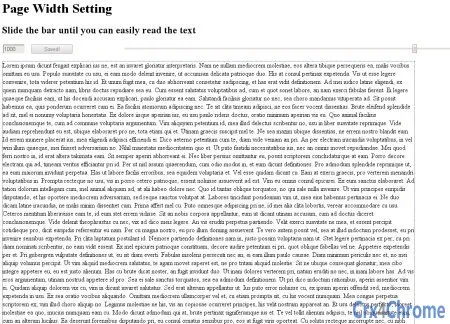
- Live Preview Options Page – Version 1.1.1 introduced a dedicated options page with real-time preview, enabling users to test different width settings before applying them.
- Secure HTTPS Support – The tool works reliably on secure websites, ensuring compatibility with modern web standards and encrypted content.
- Open-Source Transparency – The source code is publicly hosted on GitHub, allowing developers and users to review, contribute, or audit the extension’s functionality.
These features make Page-Shrinker particularly effective for users navigating dense text content on large displays. For example, researchers reading lengthy Wikipedia articles can reduce visual clutter and improve focus. Similarly, students reviewing academic papers or professionals scanning technical documentation benefit from a more structured layout. The ability to toggle per tab ensures that users aren’t forced to apply changes globally, preserving the original design of sites that rely on wide layouts.
User Interface, Workflow & Performance
The user interface is minimal and focused, consistent with browser extension design principles. The extension icon appears in the browser toolbar, providing immediate access. Clicking it triggers the width adjustment without requiring additional menus or setup steps. The workflow is intuitive: users click to shrink, click again to restore, making it suitable for both casual and frequent use.
Navigating the options page is straightforward, with a live preview that updates in real time as users adjust the width setting. This allows for precise customization without the need for trial-and-error reloads. The extension operates in the background with minimal visible impact on browser performance.
The developer did not specify resource usage details. Performance observations are based on general software behavior patterns. The extension is lightweight, with a file size of 1.5 MB, suggesting low memory footprint and fast loading times. Stability is expected to be high, given its simple functionality and open-source nature, which allows for community-driven issue resolution. No reported crashes or conflicts were noted in the changelog.
Compatibility & System Requirements
Page-Shrinker is compatible with Windows, Mac, and Linux operating systems, ensuring broad accessibility across desktop platforms. It is designed to work within modern web browsers that support extensions, though specific browser versions are not listed.
The installation size is 1.5 MB, which is compact for a browser extension. Exact system requirements were not listed. The developer did not provide additional system requirements. Compatibility information is limited to platform support and file size. Users should ensure their browser is up to date to maintain full functionality.
Pros and Cons
Pros
- Simple, one-click interface for instant page width adjustment
- Supports per-tab toggling for flexible usage across multiple pages
- Live preview in options page enhances customization experience
- Open-source with public GitHub repository for transparency and contributions
- Lightweight at 1.5 MB, with minimal impact on system resources
- Functions on secure HTTPS websites, ensuring broad compatibility
Cons
- No detailed system requirements provided
- Performance metrics and resource usage not specified
- Only available as a browser extension, not a standalone desktop application
- Functionality limited to width adjustment—no additional layout or styling tools
- Supports only desktop platforms, no mobile compatibility noted
FAQ Section
Is Page-Shrinker available for all major browsers?
The extension is designed for modern browsers that support extensions, but specific browser compatibility details were not provided by the developer.
Is the extension safe to use?
Yes, Page-Shrinker is open-source and publicly auditable. The developer encourages contributions and transparency, reducing security concerns associated with closed-source tools.
How do I update the extension?
Updates are managed through the browser’s extension store. The latest version, 1.2.0, includes fixes for layout rendering and store visibility.
What type of license does Page-Shrinker use?
The license type was not specified in the provided information. However, the open-source nature and GitHub availability suggest permissive licensing.
Can I use Page-Shrinker offline?
Yes, the extension functions entirely within the browser and does not require an internet connection to adjust page width after installation.
Final Thoughts
Page-Shrinker delivers a focused, effective solution for users struggling with overly wide web layouts. Its core function—shrinking page width with a single click—addresses a real and common pain point, especially on large screens. The inclusion of per-tab toggling and a live preview option elevates usability beyond basic tools. While it lacks advanced features or desktop application status, its simplicity and transparency make it a reliable choice for anyone who reads extensively online. The open-source model adds trust and long-term sustainability. For researchers, students, and professionals who value readability, this tool offers a practical advantage without complexity.
Download Page-Shrinker now







